


Blood Pressure Tracker
4.61.37K Reviews
App Specs
- Version
- 16.5.1-inApp
- Updated On
- License
- Free
- Downloads
- 1,000,000+
- Developer
- aadhk
- Categories
- Medical
- Platform
- Android, iOS
Screenshots
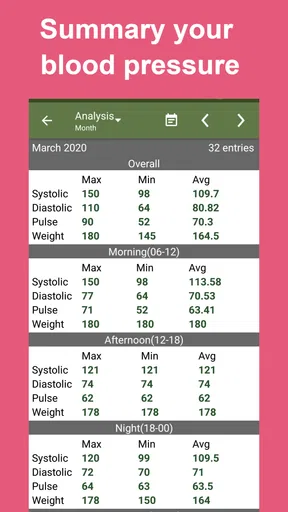
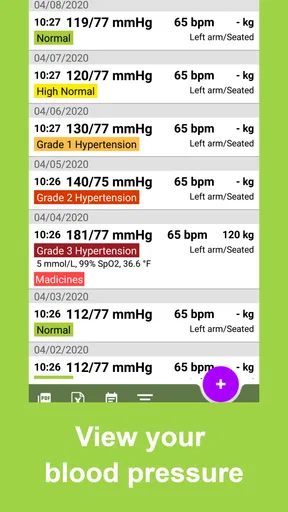
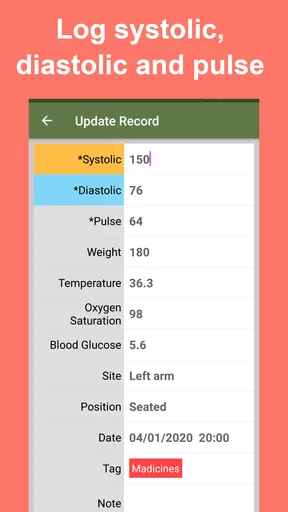
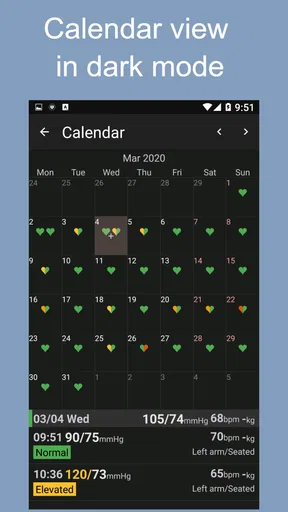
 Analysis by AppCompare
Ever find yourself in a situation where you're trying to keep tabs on your blood pressure but keep forgetting to log it down? Well, I’ve been there too. That’s when I stumbled upon the Blood Pressure Tracker app, and let me tell you, it’s been a game-changer for my health tracking routine.
Deciding What You Need From a Blood Pressure Log
Before choosing a tracker, I’d ask what you actually want it to do for you. If the main challenge is remembering readings and bringing a useful record to a medical appointment, a focused logging app can be more practical than a broad wellness platform. If you want interpretation, diagnosis, or treatment advice, though, a log is not a substitute for a clinician. I treat the app as a place to organize observations, not as a way to decide whether a reading is medically safe.
That distinction matters because blood pressure readings can be affected by the circumstances around them. I get more value from a record when I take readings in a consistent way and enter them promptly, rather than trying to reconstruct a week from memory. A tracker can help me notice what I recorded; it cannot make an inconsistent measuring routine meaningful.
For a dependable routine, I would use a suitable blood pressure monitor and enter the result into the app. The app is a companion for recording, not a device that measures pressure by itself. If you do not already have a reliable way to measure, choosing a tracker alone will not solve that part of the problem.
Getting Started with Blood Pressure Tracker
First off, let's talk about the setup. Installing the Blood Pressure Tracker app is as easy as pie. Once you download it, the app greets you with a simple and intuitive interface. No need to fumble around trying to figure out how to input your data. Just a few taps, and you're ready to roll.
What really impressed me right off the bat was the app’s user-friendly design. You know those apps that feel like you're trying to navigate a spaceship? Yeah, this isn’t one of them. Everything is laid out in a way that makes sense, even if you're not tech-savvy.
Features That Stand Out
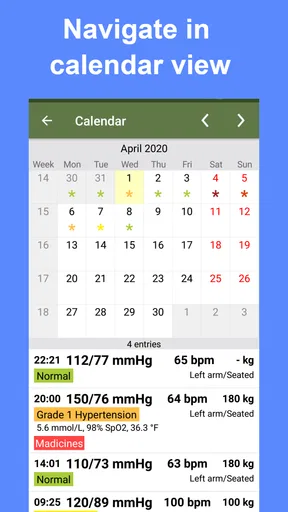
One of my favorite features is the customizable reminders. I mean, how often do you tell yourself, "I'll remember to log it later," and then completely forget? With these reminders, that’s a problem of the past. You can set them up to ping you at the best times for your schedule.
Worth Reading Before You Choose

EA SPORTS FC Mobile 26 Is a Bigger Football Game, but It Takes Time

Flipboard Shows What News Apps Must Do Beyond the Feed

Switching to Android Auto Means Rethinking Your Driving Routine

Google Calendar Makes a Crowded Week Easier to Manage

Ludo King Makes the Most of the Minutes Between Plans

Baby Panda World Brings Quick Play to Modern Phones, but Its Game Library Feels Busy
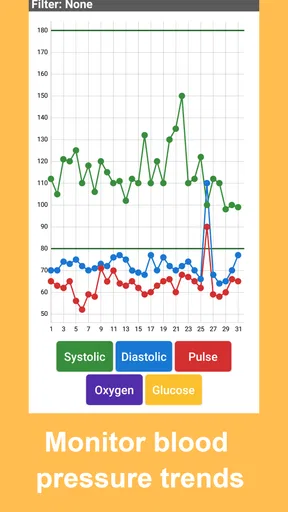
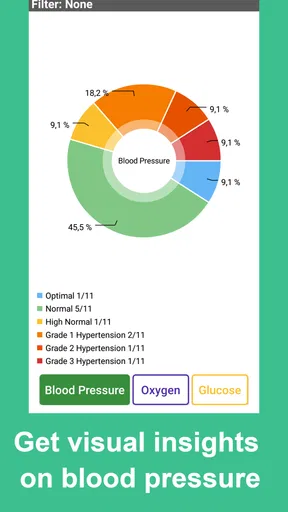
Another great feature is the detailed graphs and charts. They’re not just there for looks; they actually help you understand your blood pressure trends over time. It’s like having a mini personal health assistant in your pocket. You can easily spot patterns and maybe even figure out what's affecting your blood pressure—whether it’s stress, diet, or that extra cup of coffee you had in the morning.
The app also allows you to add notes to each reading. This is super handy because it lets you jot down any factors that might have influenced your blood pressure at the time. Maybe you had a rough day at work, or perhaps you’ve been hitting the gym a bit harder than usual.
Making the Record More Useful
A small habit makes the graphs and notes more useful: record the context while it is still fresh. If a reading follows exercise, a rushed commute, or a stressful conversation, a brief note can help you and your clinician interpret the pattern later. I would keep notes factual and short—what was different that day, rather than trying to diagnose why the number changed.
For a realistic routine, imagine checking your pressure at a regular time before breakfast, entering the result straight away, and adding a note only when something unusual might matter. A reminder can support that habit, but I would avoid setting so many alerts that they become background noise. One dependable prompt at a time you can usually follow is more useful than repeated nudges you start dismissing.
There is also a practical trade-off in how much detail to capture. Logging every possible influence can turn a quick health task into a chore, while logging only the number may leave a doctor wondering what was happening around it. I’d start with the reading and add a short note for meaningful exceptions. That keeps the record readable without losing context.
Where It Fits Among Alternatives
Compared with writing readings on paper, an app can make it easier to browse a history visually and remember entries with reminders. Paper may still suit someone who prefers a pen, wants a record that is independent of a phone, or finds screen entry uncomfortable. The better choice is the one you will use consistently; a beautifully organized digital log is no help if it stays empty.
Blood pressure readings may also appear in a monitor’s own companion app or in a general health app. Those options can be convenient if you already use them, especially when you want several kinds of health information together. A dedicated tracker is more appealing when you want the blood pressure record to stay focused and easy to review. I would compare the actual export and record-keeping workflow before moving a long history, rather than assuming every app handles old entries in the same way.
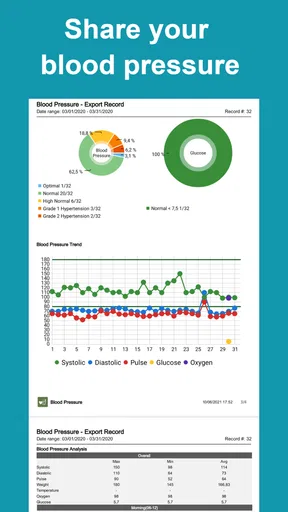
One useful decision point is who needs to read the record. If you mainly want to see your own trend, the graphs may be enough. If you plan to discuss readings at an appointment, check that the export option gives you a format you can comfortably share and that the entries include the context you need. The app’s ability to export readings and notes is a practical advantage, but it does not replace asking your clinician what information they prefer to review.
Why You'll Love It
What makes the Blood Pressure Tracker app really shine is its simplicity paired with functionality. It’s not bogged down with unnecessary features that you'll never use. Instead, it focuses on what matters most: helping you monitor and understand your blood pressure effectively.
If you're someone who loves sharing health data with your doctor, this app makes it a breeze. You can export your readings and notes in a neat format, ready to share at your next appointment. It’s like having a health diary that's always up to date.
Who Should Choose It—and Who Might Not
I can see this being a good fit for someone who already measures blood pressure at home and wants an uncomplicated place to keep a running record. It is also useful for a person who tends to forget entries, or for someone helping a family member maintain a log, provided the person entering the results can keep the records clearly separated and accurate. Before relying on any export for a visit, I would open it and check that the dates, readings, and notes are easy to follow.
I would look elsewhere if you need the app to take measurements, provide medical interpretation, or manage a broader health routine in one place. It is also not ideal for someone who will not enter readings manually or who needs a system that works entirely on paper. The app’s simple focus is a strength for logging, but that same focus means it should not be mistaken for a medical service or a replacement for professional advice.
People sometimes wonder whether they need a paid plan to make the basic idea worthwhile. The app is free to download, with in-app purchases ranging from $0.99 to $29.99 per item. I would first try the core logging routine and only consider a purchase if a specific paid option solves a real need for you; there is little point paying for something you will not use.
It is a Medical app from aadhk, rated for Everyone, and its version is 16.3.3-inApp, with Android 5.0 as the minimum operating system. It has been available since Oct 24, 2011, and has grown to over 1 million installs. Its average rating is 4.7 from around 26,000 ratings, alongside about 1,300 reviews. Those figures suggest many people have found it useful, but I would still judge it by whether its entry and export process suits your own routine.
Keeping the Switch Low-Friction
If you are moving from paper or another tracker, I would not try to recreate every old note in one sitting. Start by preserving whatever history your clinician is likely to need, then enter new readings consistently in one place. Mixing several logs for too long makes it harder to know which record is current, so choose a clear changeover point and keep any older record available for reference.
Before changing apps, also consider how you will retain a copy of information you care about. Since exporting is part of the appeal here, test that workflow with a small amount of data before making this your only record. That is not a criticism of this app in particular; it is a sensible habit whenever personal health notes matter. I would not assume that switching automatically transfers entries from a different tracker.
One limitation of any manually maintained log is the possibility of an entry mistake. I would check the numbers immediately after typing them and avoid filling several days from memory. If something looks unusual, the safest next step is to follow the guidance from your healthcare professional rather than treating a chart or an app alert as a diagnosis.
Final Thoughts
At the end of the day, the Blood Pressure Tracker app is a solid tool for anyone serious about keeping track of their health. Whether you’re managing a medical condition or just want to maintain a healthy lifestyle, this app has got your back.
So, if you're ready to take control of your blood pressure monitoring, give the Blood Pressure Tracker a try. It’s straightforward, reliable, and might just be exactly what you need to stay on top of your health game.
My recommendation is straightforward: choose it if your priority is a simple, reminder-supported record with charts, notes, and an export you can bring into a conversation with your doctor. Skip it if you expect a tracker to measure your pressure, explain what a result means, or replace medical care. Used for what it is—a personal log alongside a proper monitor and professional guidance—it can make a forgettable routine easier to maintain.
Pros
- User-friendly interface for easy navigation.
- Graphical data representation for trends.
- Customizable reminders for readings.
- Secure data backup and sync options.
- Supports multiple user profiles.
Cons
- Limited integration with other health apps.
- Ads can be intrusive for free users.
- Some features require premium access.
- Occasional syncing issues reported.
- No direct export to PDF from app.
FAQs for Blood Pressure Tracker
What features does the Blood Pressure Tracker app offer?
The Blood Pressure Tracker app provides an array of features designed to help users monitor and manage their blood pressure effectively. Key features include daily tracking of blood pressure readings, historical data analysis, reminders for medication and check-ups, customizable charts and graphs, and the ability to export data for healthcare consultations.
Is the Blood Pressure Tracker app compatible with both Android and iOS devices?
Yes, the Blood Pressure Tracker app is available for both Android and iOS platforms. Users can download the app from Google Play Store for Android devices and the App Store for iOS devices. The app is optimized for smartphones and tablets, ensuring a seamless experience across different devices.
How does the Blood Pressure Tracker app ensure data privacy?
Data privacy is a top priority for the Blood Pressure Tracker app. The app uses advanced encryption methods to secure user data, ensuring that all personal health information is protected. Users can also set up a secure login using biometrics or passwords, and the app complies with health data regulations such as GDPR and HIPAA.
Can I share my blood pressure data with my healthcare provider using the app?
Absolutely, the Blood Pressure Tracker app allows users to export their blood pressure data in various formats such as PDF or CSV. This feature makes it easy for users to share their health data with healthcare providers during consultations, enabling more informed medical decisions and personalized care plans.
Does the app offer any support if I encounter issues while using it?
Yes, the Blood Pressure Tracker app provides comprehensive customer support. Users can access a detailed FAQ section within the app, and if further assistance is needed, they can contact the support team via email or live chat. The support team is responsive and dedicated to resolving any issues promptly.


